Agent Skills:给 AI 助手装上"技能包"
Posted on Sat 31 January 2026 in Journal
| Abstract | Agent Skills:给 AI 助手装上"技能包" |
|---|---|
| Authors | Walter Fan |
| Category | AI 工具 |
| Status | v1.0 |
| Updated | 2026-01-31 |
| License | CC-BY-NC-ND 4.0 |
Agent Skills:给 AI 助手装上"技能包"
AI 助手很强,但总是"差点意思"
你有没有这样的体验?
让 Claude 帮你写一个 API,它写得很漂亮,但完全不符合你们团队的命名规范。让 Cursor 帮你生成文档,它生成了,但格式和公司模板完全不一样。让 AI 帮你做 PPT,它给你一堆代码,但你根本不知道该怎么用。
AI 知道"怎么做",但不知道"在你们这里该怎么做"。
这就是当前 AI 编程助手的核心痛点:它们有强大的通用能力,但缺乏领域知识和团队上下文。
怎么解决?一遍遍地在 prompt 里重复说明?把规范文档复制粘贴到每次对话?
有没有更优雅的方式?
有。Agent Skills。
Agent Skills 是什么?
Agent Skills 是一个简单、开放的格式,用于给 AI Agent 扩展能力。
Agent Skills are folders of instructions, scripts, and resources that agents can discover and use to do things more accurately and efficiently.
简单说:Skill 就是一个文件夹,里面装着指令、脚本和资源,AI 可以按需加载和使用。
为什么需要 Agent Skills?
| 角色 | 价值 |
|---|---|
| Skill 作者 | 写一次,到处用——同一个 Skill 可以在多个 AI 产品中使用 |
| AI 产品 | 支持 Skills 让用户开箱即获得新能力 |
| 团队/企业 | 把组织知识打包成可版本控制、可分享的技能包 |
谁在用?
Agent Skills 最初由 Anthropic 开发,现在已被众多 AI 开发工具采用:
- Cursor - 代码编辑器
- Claude Code - Anthropic 的编程助手
- GitHub Copilot - 代码助手
- VS Code - 微软的编辑器
- 还有 Gemini CLI、OpenAI Codex、Roo Code 等等……
这意味着:你写的 Skill 可以在多个工具之间复用。
一个 SKILL.md 文件的解剖
Agent Skill 的核心是一个 SKILL.md 文件。它的结构非常简单:
my-skill/
├── SKILL.md          # 必须:指令 + 元数据
├── scripts/          # 可选:可执行脚本
├── references/       # 可选:参考文档
└── assets/           # 可选:模板、资源
SKILL.md 的格式
---
name: pdf-processing
description: Extract text and tables from PDF files, fill forms, merge documents.
license: Apache-2.0
metadata:
  author: example-org
  version: "1.0"
---

# PDF Processing

## When to use this skill
Use this skill when the user needs to work with PDF files...

## How to extract text
1. Use pdfplumber for text extraction...

## How to fill forms
...
两部分组成:
- YAML Frontmatter(必须):
name:技能名称(小写字母 + 连字符,最多 64 字符)description:描述这个技能做什么、什么时候用(最多 1024 字符)-
license、metadata:可选 -
Markdown Body:
- 具体的指令和说明
- 没有格式限制,写任何对 AI 有帮助的内容
关键设计:渐进式披露(Progressive Disclosure)
这是 Agent Skills 最聪明的设计:
启动时加载        → 激活时加载         → 按需加载
(~100 tokens)      (< 5000 tokens)       (as needed)
     │                   │                    │
     ▼                   ▼                    ▼
 name + description   SKILL.md 全文      scripts/、references/
- 发现阶段:AI 只加载所有 Skill 的
name和description(约 100 tokens) - 激活阶段:当任务匹配某个 Skill 时,加载完整的
SKILL.md - 执行阶段:按需加载脚本、参考文档等资源
好处:AI 启动快,但又能在需要时获取详细上下文。
深入案例:PPTX Skill 的设计艺术
让我们深入看一个真实的、复杂的 Skill:PPTX Skill。
这个 Skill 让 AI 能够创建、编辑和分析 PowerPoint 文件。它是一个很好的学习案例,因为它展示了如何处理复杂的多步骤工作流。
Frontmatter:精准的触发条件
---
name: pptx
description: "Presentation creation, editing, and analysis. When Claude needs to work with presentations (.pptx files) for: (1) Creating new presentations, (2) Modifying or editing content, (3) Working with layouts, (4) Adding comments or speaker notes, or any other presentation tasks"
license: Proprietary. LICENSE.txt has complete terms
---
注意 description 的写法:
- 明确列出了触发场景(创建、编辑、分析)
- 包含关键词(.pptx files, presentations)
- 让 AI 知道"什么时候该用这个 Skill"
多工作流设计
PPTX Skill 设计了多个工作流,根据任务类型选择不同路径:
PPTX 操作
    │
    ├── 读取/分析 ──────────────────────────────────────┐
    │   ├── 文本提取 → markitdown                        │
    │   └── 原始 XML → unpack.py                        │
    │                                                    │
    ├── 创建新 PPT(无模板)─────────────────────────────┤
    │   └── html2pptx 工作流                             │
    │       1. 创建 HTML 文件                            │
    │       2. 用 html2pptx.js 转换                      │
    │       3. 生成缩略图验证                            │
    │                                                    │
    ├── 创建新 PPT(有模板)─────────────────────────────┤
    │   └── 模板工作流                                   │
    │       1. 提取模板文本 + 创建缩略图                  │
    │       2. 分析模板,保存 inventory                   │
    │       3. 创建大纲,选择模板                         │
    │       4. rearrange.py 重排页面                     │
    │       5. inventory.py 提取文本                     │
    │       6. 生成替换 JSON                             │
    │       7. replace.py 应用替换                       │
    │                                                    │
    └── 编辑现有 PPT ───────────────────────────────────┘
        └── OOXML 工作流
            1. unpack.py 解包
            2. 编辑 XML
            3. validate.py 验证
            4. pack.py 打包
为什么要这样设计?
因为"做 PPT"看起来是一个任务,但实际上有多种完全不同的操作: - 从零创建 vs 基于模板 - 读取内容 vs 修改内容 - 简单文本替换 vs 复杂布局调整
每种情况需要不同的工具和步骤。好的 Skill 会根据任务类型引导 AI 走正确的路径。
设计原则的体现
1. 分步骤指令
### Workflow
1. **MANDATORY - READ ENTIRE FILE**: Read [`html2pptx.md`](html2pptx.md) completely...
2. Create an HTML file for each slide with proper dimensions...
3. Create and run a JavaScript file using the [`html2pptx.js`](scripts/html2pptx.js) library...
4. **Visual validation**: Generate thumbnails and inspect for layout issues...
注意: - 用数字标注步骤顺序 - 用粗体强调关键点 - 提供具体的命令和文件路径
2. 正确示范 vs 错误示范
#### Color Palette Selection

**Choosing colors creatively**:
- **Think beyond defaults**: What colors genuinely match this specific topic?
- **Consider multiple angles**: Topic, industry, mood, energy level...

**Example color palettes** (use these to spark creativity):
1. **Classic Blue**: Deep navy (#1C2833), slate gray (#2E4053)...
2. **Teal & Coral**: Teal (#5EA8A7), deep teal (#277884)...
提供具体的选择和例子,而不是抽象的原则。
3. 错误处理和验证
4. **Visual validation**: Generate thumbnails and inspect for layout issues
   - Create thumbnail grid: `python scripts/thumbnail.py output.pptx workspace/thumbnails --cols 4`
   - Read and carefully examine the thumbnail image for:
     - **Text cutoff**: Text being cut off by header bars, shapes, or slide edges
     - **Text overlap**: Text overlapping with other text or shapes
     - **Positioning issues**: Content too close to slide boundaries
   - If issues found, adjust HTML margins/spacing/colors and regenerate
   - Repeat until all slides are visually correct
关键洞察:好的 Skill 不仅告诉 AI 怎么做,还告诉它怎么验证做对了。
4. 引用外部文件
1. **MANDATORY - READ ENTIRE FILE**: Read [`html2pptx.md`](html2pptx.md) completely from start to finish.
复杂的指令拆分到单独的文件,保持主 SKILL.md 的简洁。这就是渐进式披露的实践。
一个设计亮点:模板分析工作流
PPTX Skill 中有一个特别精巧的设计——模板分析工作流:
2. **Analyze template and save inventory to a file**:
   * Create and save a template inventory file at `template-inventory.md` containing:
     ```markdown
     # Template Inventory Analysis
     **Total Slides: [count]**
     **IMPORTANT: Slides are 0-indexed (first slide = 0, last slide = count-1)**

     ## [Category Name]
     - Slide 0: [Layout code if available] - Description/purpose
     - Slide 1: [Layout code] - Description/purpose
     ...
     ```
它让 AI 先分析模板、生成结构化的 inventory 文件,然后再基于这个 inventory 做后续操作。
为什么这样设计?
- 减少上下文污染:inventory 文件是结构化的,AI 可以精确引用
- 可复用:分析一次,多次使用
- 可审计:用户可以检查 AI 的理解是否正确
这是一个很好的模式:让 AI 先生成中间产物,然后基于中间产物继续工作。
三大核心设计原则
从 PPTX Skill 和其他优秀 Skill 中,我们可以提炼出三个核心设计原则:
1. 渐进式披露(Progressive Disclosure)
启动时:只加载 name + description(~100 tokens)
激活时:加载完整 SKILL.md(< 5000 tokens 推荐)
执行时:按需加载 scripts/、references/
实践建议:
- 主 SKILL.md 控制在 500 行以内
- 详细参考资料放到 references/ 目录
- 避免深层嵌套引用
2. 自文档化(Self-Documenting)
A skill author or user can read a SKILL.md and understand what it does, making skills easy to audit and improve.
好的 Skill 应该是人类可读的,不仅仅是给 AI 看的。这意味着: - 清晰的结构和标题 - 具体的例子和命令 - 解释"为什么"而不仅仅是"怎么做"
3. 可移植性(Portability)
Skills are just files, so they're easy to edit, version, and share.
Skill 就是文件夹,可以: - 用 Git 版本控制 - 在团队间分享 - 在不同 AI 产品间复用
如何开始写自己的 Skill
最小可行 Skill
my-first-skill/
└── SKILL.md
---
name: my-first-skill
description: A simple skill that helps with [specific task].
---

# My First Skill

## When to use
Use this skill when the user needs to...

## How to do it
1. Step one...
2. Step two...

## Example
[Provide a concrete example]
检查清单
- [ ]
name是小写字母 + 连字符,不超过 64 字符 - [ ]
description清晰描述做什么、什么时候用 - [ ] 主体内容包含具体的步骤和命令
- [ ] 提供至少一个具体例子
- [ ] 复杂内容拆分到
references/目录 - [ ] 可执行脚本放在
scripts/目录 - [ ] 用 skills-ref 验证格式
Skill 设计模式
| 模式 | 适用场景 | 例子 |
|---|---|---|
| 单一工作流 | 简单、线性的任务 | 代码格式化、diagram-render |
| 多工作流 | 同一领域的多种操作 | PPTX(创建/编辑/分析) |
| 先分析后执行 | 需要理解上下文的任务 | 模板填充 |
| 验证循环 | 需要质量保证的任务 | 生成 + 检查 + 修复 |
实战案例:diagram-render Skill
说了这么多理论,来看一个我自己写的 Skill:diagram-render。
这个 Skill 的目的很简单:把 PlantUML、Mermaid、Graphviz 代码块渲染成图片。没错,本文的思维导图就是用它生成的。
文件结构
.claude/skills/diagram-render/
├── skill.md              # 指令文档
└── scripts/
    ├── render_diagram.py # 渲染脚本
    └── requirements.txt  # Python 依赖
SKILL.md 片段
# Diagram Render Skill

A skill for rendering diagrams from code blocks (PlantUML, Mermaid, Graphviz) to PNG/SVG images.

## When to Use

Use this skill when:
- Any task requires rendering diagrams from code to images
- Processing markdown files that contain diagram code blocks
- Converting PlantUML, Mermaid, or Graphviz scripts to PNG/SVG
- Generating visual documentation from code

## Supported Diagram Types

| Type | Code Block | Description |
|------|------------|-------------|
| PlantUML | \`\`\`plantuml | UML diagrams, mind maps, sequence diagrams |
| Mermaid | \`\`\`mermaid | Flowcharts, sequence diagrams, ER diagrams |
| Graphviz | \`\`\`dot | Directed/undirected graphs |

## Usage

\`\`\`bash
# 使用 uv 运行(推荐,自动处理依赖)
uv run .claude/skills/diagram-render/scripts/render_diagram.py plantuml \
    -i diagram.puml -o output.png

# 从 stdin 读取
echo '@startuml
Alice -> Bob: Hello
@enduml' | uv run render_diagram.py plantuml -o output.png
\`\`\`
设计亮点
这个 Skill 虽然简单,但有几个值得借鉴的点:
1. 清晰的触发条件
When to Use 部分明确列出了什么时候该用这个 Skill。AI 看到 "diagram code blocks" 或 "PlantUML" 就知道该激活它。
2. 带脚本的 Skill
把渲染逻辑封装成独立的 Python 脚本,而不是在 SKILL.md 里写一堆 shell 命令。好处:
- 脚本可以独立测试
- 错误处理更完善
- 可以用 uv run 自动管理依赖
3. 渐进式依赖管理
脚本头部使用 PEP 723 的内联依赖声明:
# /// script
# requires-python = ">=3.9"
# dependencies = [
#     "requests>=2.28.0",
# ]
# ///
这样用 uv run 时会自动安装依赖,无需手动 pip install。
4. 多种渲染后端
支持 PlantUML 公共服务器(在线)、Graphviz 本地渲染、Mermaid CLI 渲染,自动 fallback。
实际使用效果
本文的思维导图就是这样生成的:
# 1. 提取 PlantUML 代码到临时文件
cat > /tmp/mindmap.puml << 'EOF'
@startmindmap
* Agent Skills
** 是什么
** 怎么用
@endmindmap
EOF
# 2. 调用渲染脚本
uv run .claude/skills/diagram-render/scripts/render_diagram.py plantuml \
-i /tmp/mindmap.puml \
-o content/images/agent_skills_mindmap.png \
-v
# 3. 在文章中引用
# 
输出:Saved to: content/images/agent_skills_mindmap.png (84722 bytes)
这就是 Skill 的价值:把一个重复性的操作(渲染图表)封装成可复用的能力,AI 和人都能用。
推荐工具:Ai-Agent-Skills
说到 Skill 的分享和复用,不得不提一个好工具:Ai-Agent-Skills。
这是一个 "Homebrew for AI Agent Skills"——就像 macOS 上的 Homebrew 让安装软件变得简单,这个工具让安装 AI Agent Skills 变得一行命令搞定。
一行命令,所有 Agent
# 安装一个 skill 到所有支持的 agent
npx ai-agent-skills install frontend-design

# 只安装到 Cursor
npx ai-agent-skills install frontend-design --agent cursor

# 交互式浏览可用的 skills
npx ai-agent-skills browse

# 从 GitHub 仓库安装
npx ai-agent-skills install anthropics/skills/pdf
支持的 Agent
| Agent | 安装位置 |
|---|---|
| Claude Code | ~/.claude/skills/ |
| Cursor | .cursor/skills/ |
| GitHub Copilot | .github/skills/ |
| VS Code | .github/skills/ |
| Gemini CLI | ~/.gemini/skills/ |
| Codex, Amp, Goose, Letta... | 各自的 skills 目录 |
一次安装,多个 Agent 同时可用——这才是 Skill 可移植性的真正体现。
已有的 Skills
仓库里已经收集了不少实用的 Skill:
- 开发类:
frontend-design、mcp-builder、backend-development、webapp-testing - 文档类:
pdf、xlsx、docx、pptx - 创意类:
canvas-design、algorithmic-art、slack-gif-creator - 效率类:
doc-coauthoring、jira-issues、code-documentation
我的贡献:diagram-render
既然写了 diagram-render skill,当然要分享出去。我已经向 Ai-Agent-Skills 仓库提交了 PR:
PR #10: Add diagram-render skill
这个 PR 把前面介绍的 diagram-render skill 贡献到社区,支持:
- PlantUML(UML 图、思维导图、时序图等)
- Mermaid(流程图、ER 图、甘特图等)
- Graphviz(有向图、无向图)
如果 PR 合并后,你可以直接用一行命令安装:
npx ai-agent-skills install diagram-render
开源社区的魅力就在于此:你写的工具,别人能用;别人写的工具,你也能用。Skills 的可移植性让这种分享变得更简单。
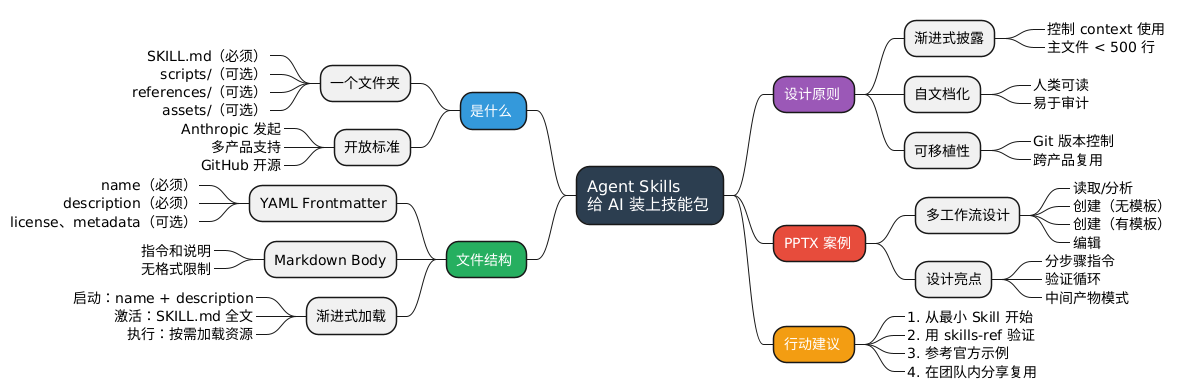
思维导图:一图看懂 Agent Skills
@startmindmap
<style>
mindmapDiagram {
  .root {
    BackgroundColor #2C3E50
    FontColor white
    FontSize 16
  }
  .what {
    BackgroundColor #3498DB
    FontColor white
  }
  .structure {
    BackgroundColor #27AE60
    FontColor white
  }
  .principle {
    BackgroundColor #9B59B6
    FontColor white
  }
  .example {
    BackgroundColor #E74C3C
    FontColor white
  }
  .action {
    BackgroundColor #F39C12
    FontColor white
  }
}
</style>

*[#2C3E50] Agent Skills\n给 AI 装上技能包 <<root>>

left side

**[#3498DB] 是什么 <<what>>
*** 一个文件夹
****_ SKILL.md(必须)
****_ scripts/(可选)
****_ references/(可选)
****_ assets/(可选)
*** 开放标准
****_ Anthropic 发起
****_ 多产品支持
****_ GitHub 开源

**[#27AE60] 文件结构 <<structure>>
*** YAML Frontmatter
****_ name(必须)
****_ description(必须)
****_ license、metadata(可选)
*** Markdown Body
****_ 指令和说明
****_ 无格式限制
*** 渐进式加载
****_ 启动:name + description
****_ 激活:SKILL.md 全文
****_ 执行:按需加载资源

right side

**[#9B59B6] 设计原则 <<principle>>
*** 渐进式披露
****_ 控制 context 使用
****_ 主文件 < 500 行
*** 自文档化
****_ 人类可读
****_ 易于审计
*** 可移植性
****_ Git 版本控制
****_ 跨产品复用

**[#E74C3C] PPTX 案例 <<example>>
*** 多工作流设计
****_ 读取/分析
****_ 创建(无模板)
****_ 创建(有模板)
****_ 编辑
*** 设计亮点
****_ 分步骤指令
****_ 验证循环
****_ 中间产物模式

**[#F39C12] 行动建议 <<action>>
***_ 1. 从最小 Skill 开始
***_ 2. 用 skills-ref 验证
***_ 3. 参考官方示例
***_ 4. 在团队内分享复用
@endmindmap
小结
Agent Skills 解决了什么问题?
AI 助手有强大的通用能力,但缺乏领域知识和团队上下文。Agent Skills 让你把这些知识打包成可复用、可版本控制、可跨产品使用的技能包。
核心设计:
- 结构简单:一个 SKILL.md 文件 + 可选的脚本/资源
- 渐进式披露:启动快,但能按需获取详细上下文
- 自文档化:人和 AI 都能理解
- 可移植:一次编写,多处运行
从 PPTX Skill 学到的:
- 复杂任务需要多工作流设计
- 好的 Skill 不仅说"怎么做",还说"怎么验证做对了"
- 先分析后执行是处理复杂任务的好模式
- 把详细参考资料拆分到单独文件
行动清单
想开始使用 Agent Skills?
- [ ] 用
npx ai-agent-skills browse浏览并安装现有 Skills - [ ] 浏览 官方示例 获取灵感
- [ ] 读一遍 规范文档
- [ ] 从一个简单的 Skill 开始(比如团队代码规范)
- [ ] 用 skills-ref 验证你的 Skill
- [ ] 把你的 Skill 贡献到 Ai-Agent-Skills
- [ ] 在团队内分享和迭代
延伸阅读
- Agent Skills 官网 —— 官方文档和规范
- 官方示例库 —— 包括 PPTX、PDF、DOCX 等 Skill
- 最佳实践指南 —— Anthropic 的 Skill 编写指南
- Ai-Agent-Skills —— 一行命令安装 Skills 的工具
- 我的 PR: diagram-render skill —— 贡献图表渲染能力
你们团队有哪些重复性的工作可以打包成 Skill?代码规范检查?文档模板填充?API 设计指南?
欢迎在评论区分享你的想法,或者你已经写好的 Skill。
本作品采用知识共享署名-非商业性使用-禁止演绎 4.0 国际许可协议进行许可。